
How to Link Your GHL Course to a Funnel Checkout with Triggers
Updated November 21, 2022
Without a direct link between your funnel checkout and your membership course, buyers complete a purchase but never receive access. This tutorial walks you through creating a GoHighLevel membership offer and connecting it to your funnel checkout via triggers or the built-in product settings toggle.
Follow these steps to connect your membership to your funnel checkout, enabling access for the purchaser:
Part 1: Create an offer and add the course/product to it in the membership editor area.
To access the membership editor area navigate to Funnels + Websites > Membership > Products > Offers > Create Offer. You’ll see a list of all your offers:

Check out the article “How to Build and Edit an Offer in Memberships” with a step-by-step video on creating offers.
Part 2: Choose between two options to give your contacts access after making a purchase.
Option 1: Create a trigger based on two-step checkout that grants access to the offer.
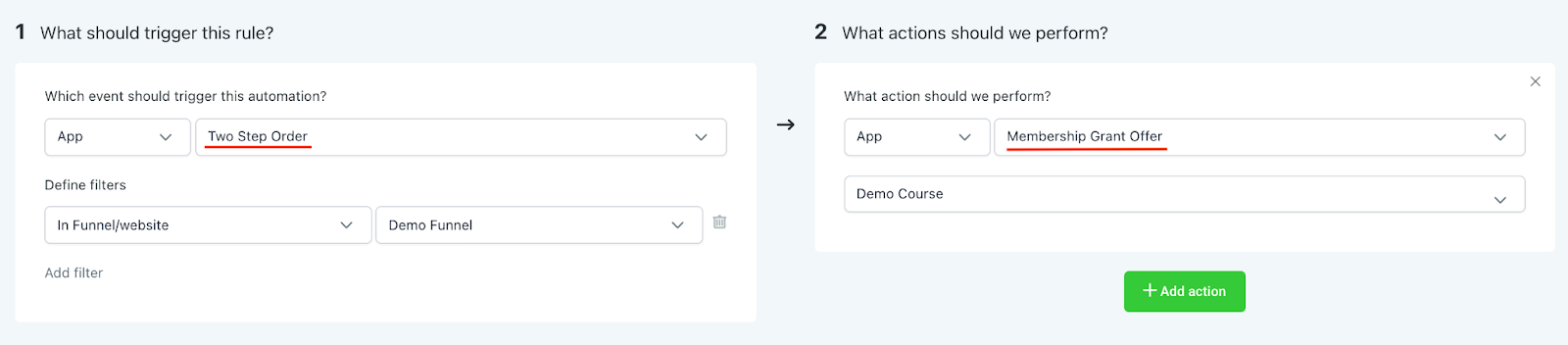
Option 2: Toggle on the Membership Offer option in the funnel product settings.

Step 1: Click into the Funnel > Edit > Products.
Step 2: Toggle on the Membership Offer and Select the offer in the dropdown.
Step 3: Save to confirm your changes.
Keep learning