
How to Find a Client's Location ID in GoHighLevel
Updated June 2, 2023
When raising a GoHighLevel support ticket, you will often be asked for the Location ID tied to the affected sub-account — and not knowing where to find it causes unnecessary delays. This guide walks you through retrieving any client's Location ID from Business Info settings so your agency can get issues resolved faster.
Finding Your Client’s Location ID
When seeking assistance from our support teams, they may ask you for the location ID associated with the specific account experiencing an issue. The location ID is a unique identifier for each sub-account within your agency account. It enables us to pinpoint and address any troubleshooting needs quickly.
To locate the location ID, follow these steps:
- Go to the location view in your account.
- Click on Settings and navigate to Business Info.
- The location ID will be displayed in this section, as shown below:
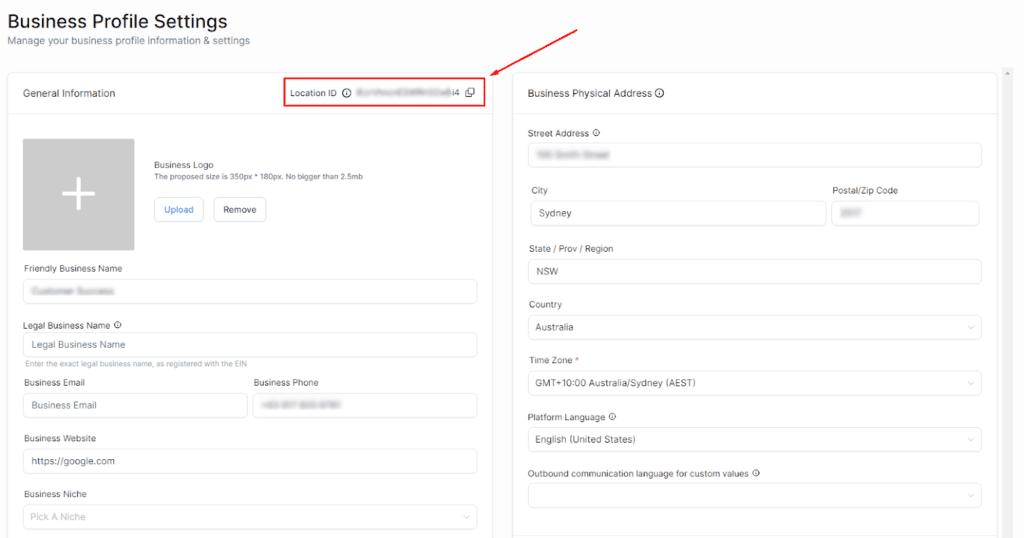
Providing the correct location ID ensures we can promptly assist you in resolving any concerns related to your client’s account.
NOTE: Please refrain from sharing the location ID with individuals outside of your organization.
Keep learning